Link to this article: https://support.driveshops.app/en/support/solutions/articles/70000681157-sms-app-setting-your-technician-pay-triggers
In our shop management system, you have the flexibility to determine exactly when labor hours are credited to your technicians' payroll. Choosing the right "trigger" helps you balance shop cash flow with technician motivation.
Setting Location:
Other Settings >> Options
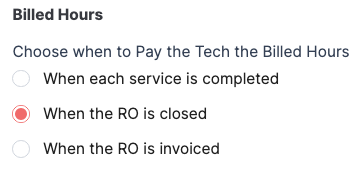 Here are the three options for when technicians receive credit for their billed hours:
When Each Service is Completed
With this setting, technicians are credited as soon as a specific job on a Repair Order (RO) is marked as finished.How it works: The entire RO remains open, but the technician gets "paid" for completed sevices immediately.
The Benefit: This is the most technician-friendly option. It ensures your team is compensated in the current pay period for the work they’ve actually performed, even if the vehicle is waiting on parts for other services.
When the RO is Closed
Technicians receive credit only once every job on the Repair Order is finished and the RO is marked complete.How it works: Credit is issued when the repair order is closed, regardless of whether the customer has paid yet.
The Benefit: This encourages teamwork and efficiency. It motivates technicians to finish the entire vehicle quickly rather than cherry-picking easy jobs and leaving the RO hanging on the board.
When the RO is Invoiced
Credit is only issued once the Repair Order is officially posted (paid in full and vehicle has been picked up) or sent to Accounts Receivable.How it works: As long as the RO is active on your Workflow, the labor hours will not appear on production reports.
The Benefit: This is the most conservative approach for shop accounting. It ensures that technician labor expenses are only recognized once the shop has finalized the revenue for that visit, keeping your daily profit margins accurate and synchronized.
Was this article helpful?
That’s Great!
Thank you for your feedback
Sorry! We couldn't be helpful
Thank you for your feedback
Feedback sent
We appreciate your effort and will try to fix the article