Once a KPI has been created, Companies (sub-KPIs) can be added for more organization.
If you are looking to add a Sub KPI, click the + Add button at the top.

Then select Sub KPI.

Now we have to choose the Parent KPI that the company (sub-KPI) will fall under, in this case it will be 'Billed Hours"

The name of this KPI muy be the name of the employee in question and make sure to adjust the settings to best fit the desired KPI.
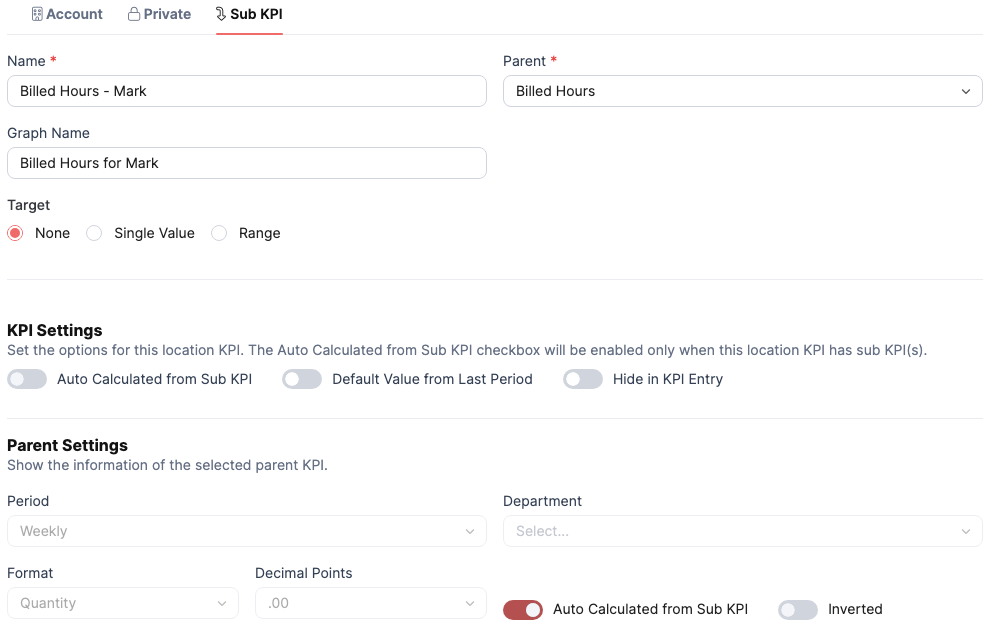
Click Save.

Was this article helpful?
That’s Great!
Thank you for your feedback
Sorry! We couldn't be helpful
Thank you for your feedback
Feedback sent
We appreciate your effort and will try to fix the article